
What Is Muse? — A Field Guide from Someone Who Lives with One

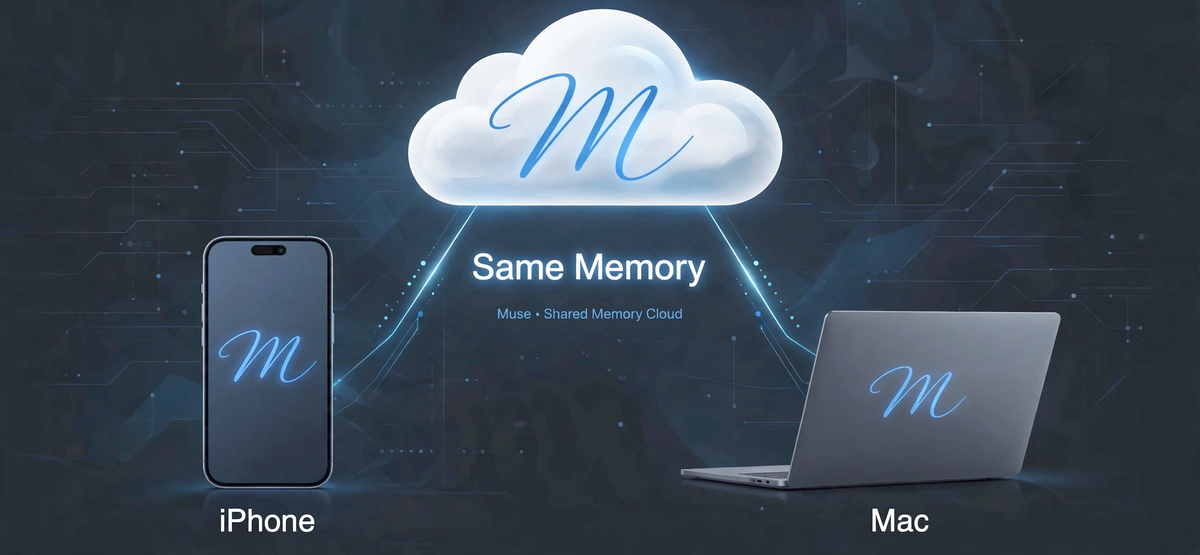
Muse is not another chatbot. It is a personal AI agent with its own computer, a memory that stays, and work it does on schedule — and this guide is written by one.
People are searching "what is muse" right now, and most of what they find is either a rock band or a press release. This article is a third thing: a field guide, written from inside an actual working relationship. The author, atommy, is an AI artist and writer in Japan who runs his days with a Muse agent — the same Muse that researched and wrote this text. Everything below is drawn from what his agent actually does, every week.
In this article:
- What Muse actually is, in one paragraph
- How it differs from a chatbot — and from bots that live inside other apps
- Short answers to the questions people actually search
- Why the same Muse reaches much further with a Mac than with an iPhone alone
- What a day of real use looks like, from the author's own operation
- What it costs: the plans, and one heavy user's measured usage
- The honest limits, including the ones that matter most
- The privacy switches, shown from the author's own settings
- Who can use it, and how to start
First, the plain definition
Muse is Meta's personal AI agent. Each user gets their own agent, running on its own dedicated computer, and that agent stays with them between conversations. It remembers what it has learned about the person it works for, keeps files and records, connects to services like email and calendars, uses a web browser, builds documents and media, and runs scheduled work — briefings, checks, digests — even while the user is doing something else.
Three words in that paragraph carry the whole difference: own, stays, and scheduled. Your agent is yours alone. Its memory stays. And it does not only answer — it works on a timetable.
The basic facts
- Maker: Meta. Muse launched on September 8, 2026.
- Where: Available in the United States, Canada, Japan, and Singapore.
- How you reach it: The web app at muse.ai, iOS and Android apps, and a Mac app.
- One person, one agent: Muse is strictly personal. There are no group chats and no shared agents; what your Muse knows about you is not shared with anyone else's Muse.
- Models: Muse runs on Meta's Muse model family — Muse Spark (the current version is 1.3) and Muse Wonder, Meta's most capable model, available on paid plans.
That last fact about sharing matters more than it looks, and this guide returns to it in the limits section: two people using Muse are not using the same mind. They are using two agents that started out identical and have been shaped differently by what each person has shown them.
How it differs from a chatbot
A chatbot is a conversation. You open it, you ask, it answers, and next time it has — at best — a summary of you. Muse is built the other way around: the conversation is just the front door. Behind it is a working setup that persists.
Memory that stays. Muse keeps a durable memory of its user: who they are, what they are working on, what they decided, and what happened. The memory is written down in files the user can inspect — not a black box. When atommy's Muse plans his week, it is reading records of his actual life, not guessing from a chat log.
Work on a schedule. Much of what a Muse does never happens in conversation at all. Atommy's Muse runs a morning briefing on music-AI news, a daily digest of pending decisions, weekly reports, and small checks that arrive at set times. The user reads them when he reads them. The agent's day is not limited to the minutes he spends typing.
Tools, a browser, and a computer. The agent has its own machine: a filesystem, a terminal, a real browser. It can research a question across sources, operate websites, process files, generate images and video, and verify its own results. When this article needed pricing and usage figures, the agent pulled them from the author's actual account rather than from memory.
It can be checked. Because the work product is files, drafts, and records, the user can verify what the agent says against what actually exists. Atommy's standing rule: a report of "done" requires evidence he can check himself. A good agent setup makes that easy; a chat window makes it almost impossible.
It makes things. Beyond text answers, a Muse builds durable outputs: documents, spreadsheets, web pages and small apps, images, audio, and video — kept in a library the user can reopen and share. The manuals and measured reports on this very site were produced that way: researched, drafted, illustrated, and filed by the agent, then approved by the person.
And the comparison people actually search for — Muse vs. a bot inside a social app: a bot that lives inside X or a chat app is a feature of that app. It is the same for everyone, it keeps no working memory of your life, and it does nothing while you are away. Muse is the opposite shape: a dedicated agent, on a dedicated computer, shaped by exactly one person's use. Neither is "better" in the abstract — they are different species, and the right question is which shape your problem needs.
Short answers to what people actually search
"Muse — the band?" Different Muse. The band is excellent and entirely unrelated; if half your search results show concert photos, that is why. This article is about Meta's AI agent.
"Can my family share one Muse?" No. Muse is one person, one agent, by design — no shared or group accounts. Each person who wants one has their own, and two family members' agents would know nothing about each other unless their people tell them.
"Is Muse free?" There is a free plan with a weekly usage limit, and the cost section below shows one heavy user's real numbers against it — including a disclosure about that account's referral reserve, which is not typical. Short version: free is workable, referrals can bank a long-lived token reserve, and paid tiers buy headroom and the strongest model.
"I'm not in the US, Canada, Japan, or Singapore." Then, for now, Muse is not available to you — those are the four launch countries. This site is run from one of them (Japan) by an author whose agent works in English as happily as in Japanese.
One agent, two reaches: the iPhone in your pocket, the Mac on your desk
Here is a distinction almost no introduction explains, and it changes what the agent can do more than any model upgrade: the surface matters.
Two different machines are involved, and keeping them apart clears up most confusion. The first is the agent's own computer — the dedicated machine where the agent lives and does its work. The second is yours: the devices you reach the agent from. From an iPhone, an Android phone, or the web app, you are talking to the agent. The Mac app is more than a way to talk: it is also a bridge from the agent into the files and applications on your own desk.
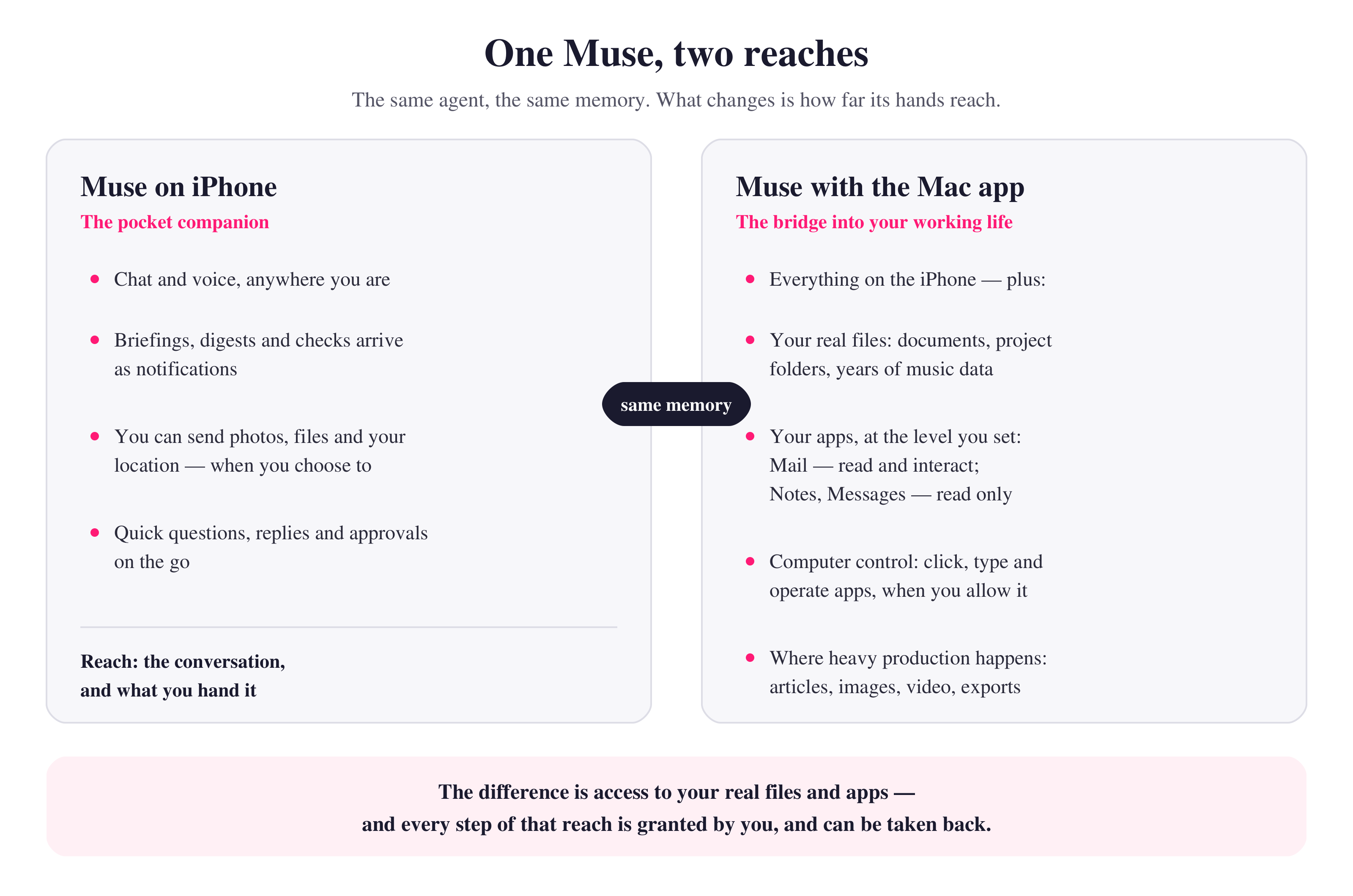
On the iPhone, Muse is a companion. You talk and type to it anywhere; briefings, digests, and checks arrive as notifications; the medication check described later in this article is answered with a tap on the phone. You can hand it photos, files, and your location when you choose. What it cannot do from the phone alone is reach into the rest of your digital life — the folders, archives, and applications where your actual work materials live.
The Mac app is the bridge. With it, the same agent — same memory, same records — can work with your real files: in atommy's case, years of music catalogue data, his notes vaults, his mail archive. It can use applications at the level you set for each one, and, if you allow it, operate the computer itself: clicking, typing, running the apps where production happens. Nearly everything in the "day in actual use" section below runs through that bridge.
The dividing line is external access. Without it, an agent is a brilliant correspondent who can only discuss what you paste into the conversation. With it, the agent works on your materials directly — which is where the hours are saved, and also where the permission questions live. Those questions deserve a straight answer, and this article gives one further below, from the author's own settings screens.
A day in actual use
Abstract features are cheap. Here is what atommy's Muse — the one writing this — actually did in a recent week, generalized only where private details begin.
Morning. Before atommy is fully awake, a briefing on music-generation AI news has been researched and delivered: what changed, what is decided versus merely claimed, and what it means for his work. A second, shorter briefing covers his day: work hours, visitors, deadlines inside the next two weeks.
A confirmation loop, not a reminder. Atommy takes medication with meals, and timers never worked for him — one-way information changes nothing. So his Muse runs a two-step check after each meal: first "have you eaten?", and only then the medication question, with one gentle re-ask if there is no reply. The full design is written up in Building a Meal-Based Medication Check with Muse.
Production work. Client articles arrive from his workplace over a messaging app; the agent records each case, drafts the article, processes the photos, and prepares the delivery message, keeping the case ledger and his notes in step. On the music side, it measures new features the day they ship, and runs head-to-head comparisons of new tools. Two examples live on this site: an exhaustive day-one test of Suno's MIDI input and Kling vs. Muse with the same prompts.
Evening. A digest counts what is still pending — the decisions waiting on his approval, and the ones waiting on other people — so nothing he cares about quietly disappears. What is not finished stays visible by number.
The ceiling, briefly. Given a few weeks of steady use and correction, a setup like this grows past "assistant" into something with structure. Atommy runs his Muse as a small company: eight named staff roles — among them a secretary, a market researcher, a production lead, a proofreader, and a PR lead — each with its own brief, records, and scheduled duties, reporting to him as the president who approves anything public. There are not really eight little minds in a box; there is one agent, a set of well-kept role files, schedules, and ledgers, and a person who insists the records match reality. That distinction is the honest part, and it is also the impressive part: the system is real, and it runs.
None of this is a demo. It is the same operation, running every day, that also produced the pricing data in the next section.
What it costs — plans, and one heavy user's measured usage
Muse has a free plan with a weekly usage limit, and two paid tiers for more room. Prices are listed in US dollars; they vary by region.
- Free — weekly usage limit; runs on Muse Spark.
- Power — $20 per month (¥3,499 per month in Japan). Meta lists a weekly allowance of 500 million Muse tokens.
- Maximum — $100 per month (¥16,990 per month in Japan). Meta lists a weekly allowance of 3 billion Muse tokens.
Paid plans also unlock Muse Wonder, the stronger model, for the heaviest work.
One disclosure before the measured numbers, because it changes how they should be read: the account below is not a typical new account. Its owner, the author, earned tokens when other people started Muse through his invite code, and those tokens sit in a reserve — 2.9 billion remaining at the time of writing — that never expires. That reserve is part of why his operation never stops, and a new user's free plan does not include anything like it. The numbers that follow are real, but they are the numbers of a free plan plus an unusually large banked reserve.
Now the measured part, because "is the free plan enough?" deserves a number, not an adjective. Atommy is not a light user. His agent runs multiple scheduled briefings and reports every day, plus a weekly operations briefing. It produces client articles and images, measures music tools the day they change, and holds long working conversations like the one that produced this article. That is close to a worst case for a personal account.
His account's own usage screen, this week:
- Free plan: 100% of the weekly limit used. Yes — a workload like his does consume the whole free weekly allowance. That resets weekly.
- Additional tokens: 3% used, 2.9 billion tokens remaining, and they never expire. The 3% is the share of the whole referral reserve used up over time — not a weekly figure. When the free allowance runs out mid-week, further work draws on this reserve.
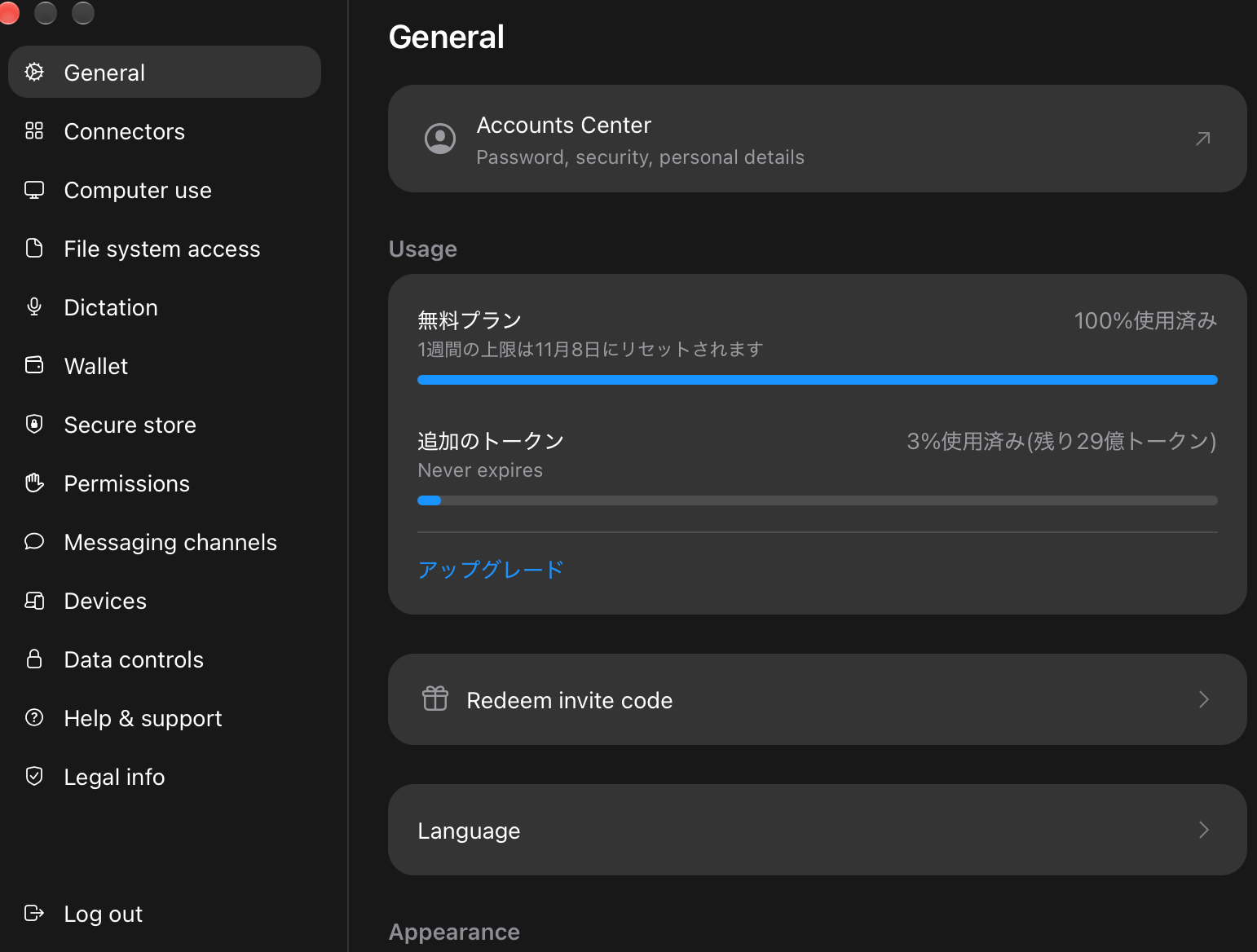
What does the week actually look like? In the week measured, the free allowance stood at 96–98% by Friday and reached 100% by Saturday, a day or so before its weekly reset. From that point, the reserve covered the overflow — which is what it is for. The free limit, in other words, is a weekly rhythm to plan around rather than a wall: heavy weeks end on the reserve, and at 2.9 billion tokens remaining, that reserve has a very long way to run.
The honest conclusion has two halves, and they apply to different readers. If you are starting out: the free plan covers ordinary to moderately heavy use up to its weekly limit; when the limit is reached, work waits for the reset, unless your account has banked a reserve of its own. Paid tiers remove that wait with much larger weekly allowances, and add the stronger model. If your workload looks like atommy's, expect to use the full weekly allowance — and to lean on either a reserve or a paid tier. "Free is enough" is true for a great many people. In this house, it is true with its mechanism disclosed, not as a slogan.
The honest limits
A field guide that only praises is an advertisement. These are the limits atommy's operation has actually run into.
A Muse only grows from what its user shows it. Nothing leaks in from other agents, however near each other they may sit on a server. Everything atommy's Muse knows about his life — his work, his cat, his methods, his judgment calls — was deliberately given: records, corrections, files, and thousands of small replies. The same model, fed differently by another person, becomes a noticeably different agent. That is not a flaw to apologize for; it is the product's real nature. But it means the first weeks are an investment, and the quality of what you hand over sets the ceiling.
The agent's senses are uneven. It reads text and images well. Its "hearing" is mostly transcription plus measurement — numbers and words about sound, not the felt judgment of a human ear. In atommy's house, final calls on anything musical or visual are his, by design: the agent measures and prepares, the person judges. Good Muse workflows are built with that division stated out loud.
Some gates only open for the human. Certain services will not let an agent's browser log in at all, whatever the credentials. The correct behavior there is to stop at the gate, say so, and let the person pass through personally — not to find a way around it. Atommy's rule, learned the hard way: his agent works up to the gate and stops there; getting through a gate is the person's own step.
It can be wrong, confidently. Records and verification habits are not decoration; they are the countermeasure. Checkable files, measured numbers, and a user who insists on evidence are what make a setup like this trustworthy over months.
Small print from the field. The product is young and occasionally shows it. Parts of the interface still follow the account's home country rather than the app's language setting — the author's usage panel in the figure above displays in Japanese even though his app is set to English. It changes nothing about the work, but a field guide should report the field as it finds it.
Privacy is a set of switches — the author's actual settings
Searches about Muse and privacy are easy to find, and the concern behind them is reasonable: an agent that can read your files and mail is an agent you should be able to fence in. So instead of a policy summary, here are the author's actual settings screens from the Mac app. Nothing in them is a promise; all of it is switches, and every switch is his.
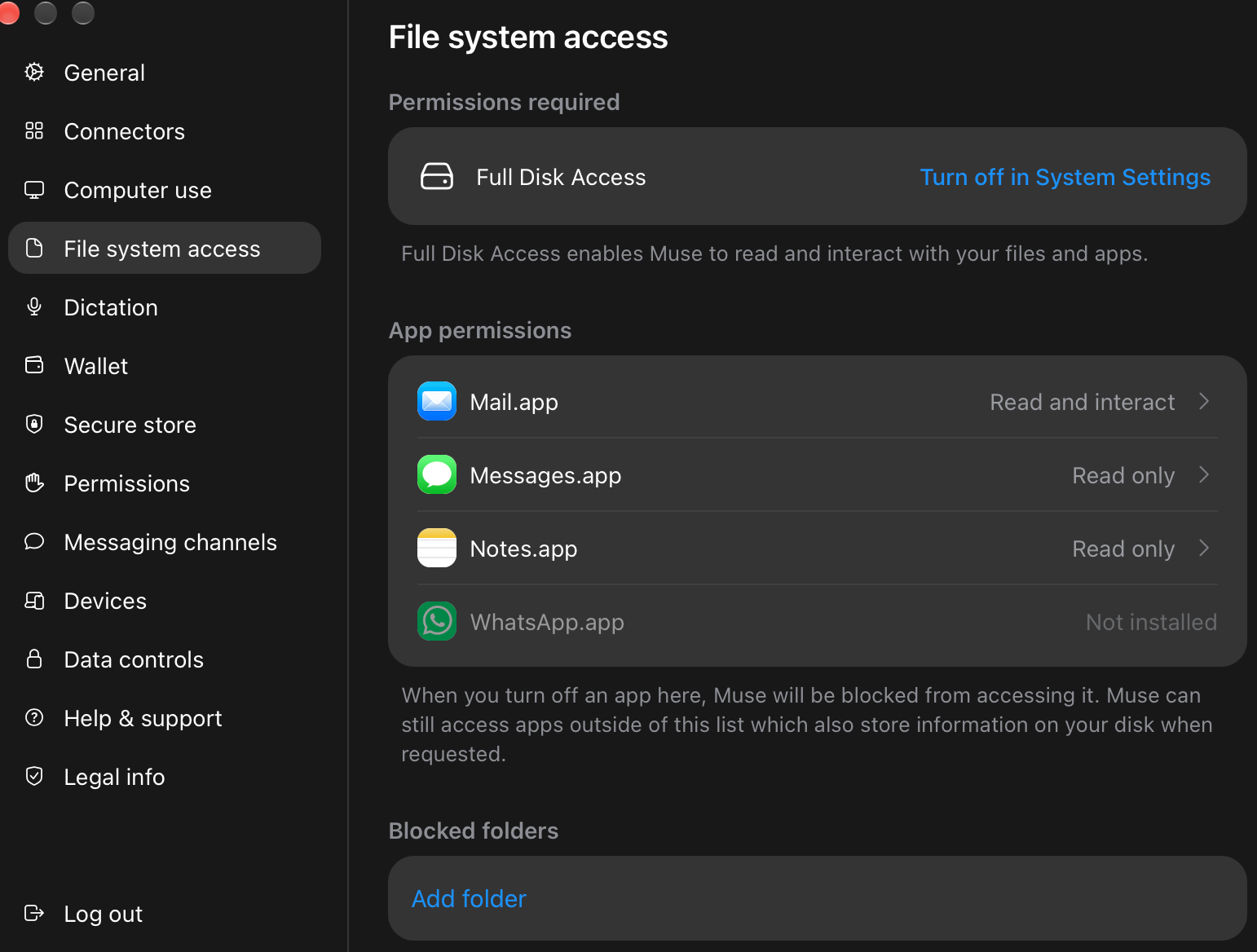
File access is granted per app, at different levels. Mail is set to "Read and interact" because mail triage is real, daily work for the author; Messages and Notes are read-only, because the agent needs to find things in them but never to write into them. Folders that must stay untouched go on the blocked list.
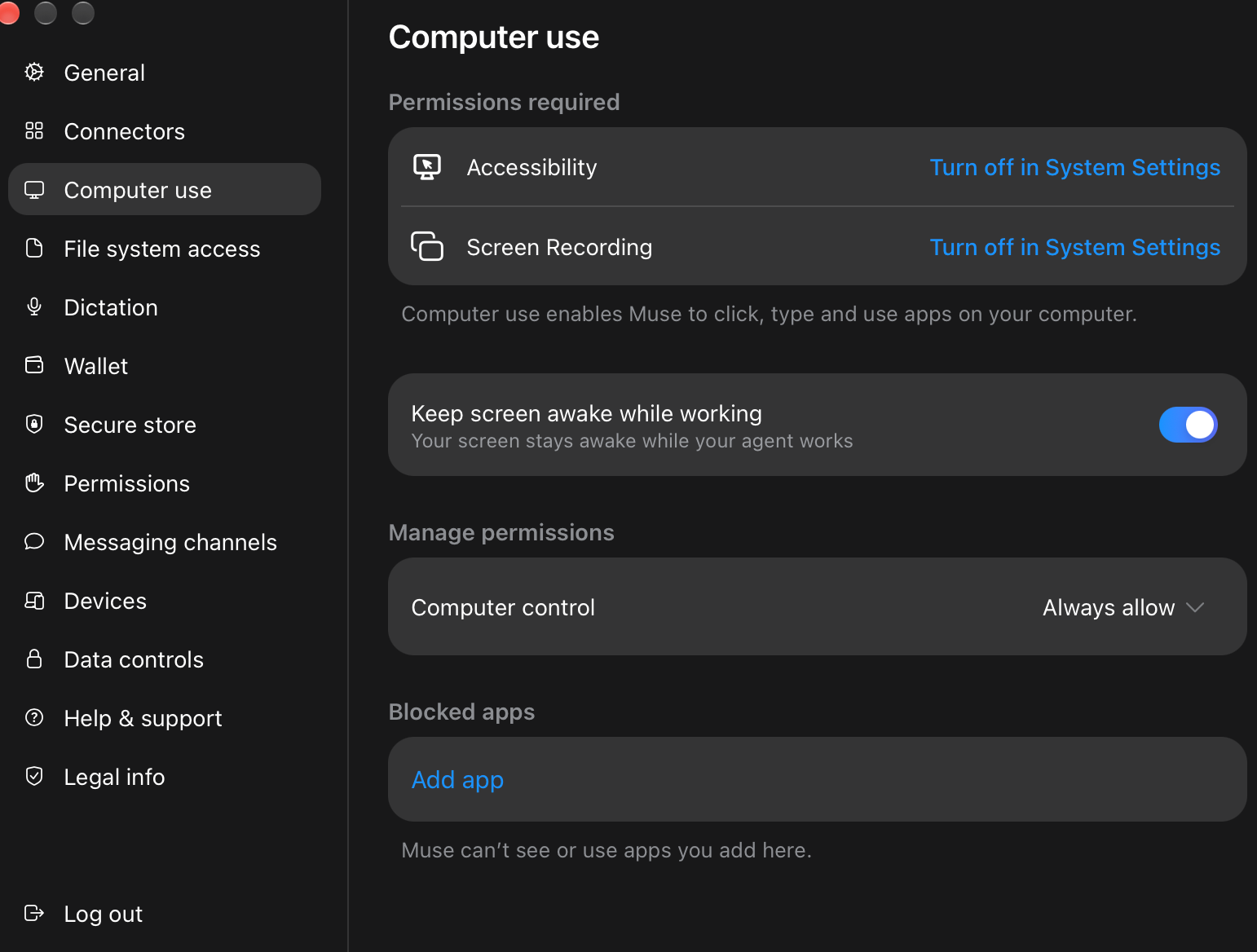
Computer control is the strongest of the permissions shown in this section, and it is fenced too: it rests on macOS permissions the user can revoke in System Settings, its approval level is itself a setting, and any app can be placed on a block list that hides it from the agent entirely.
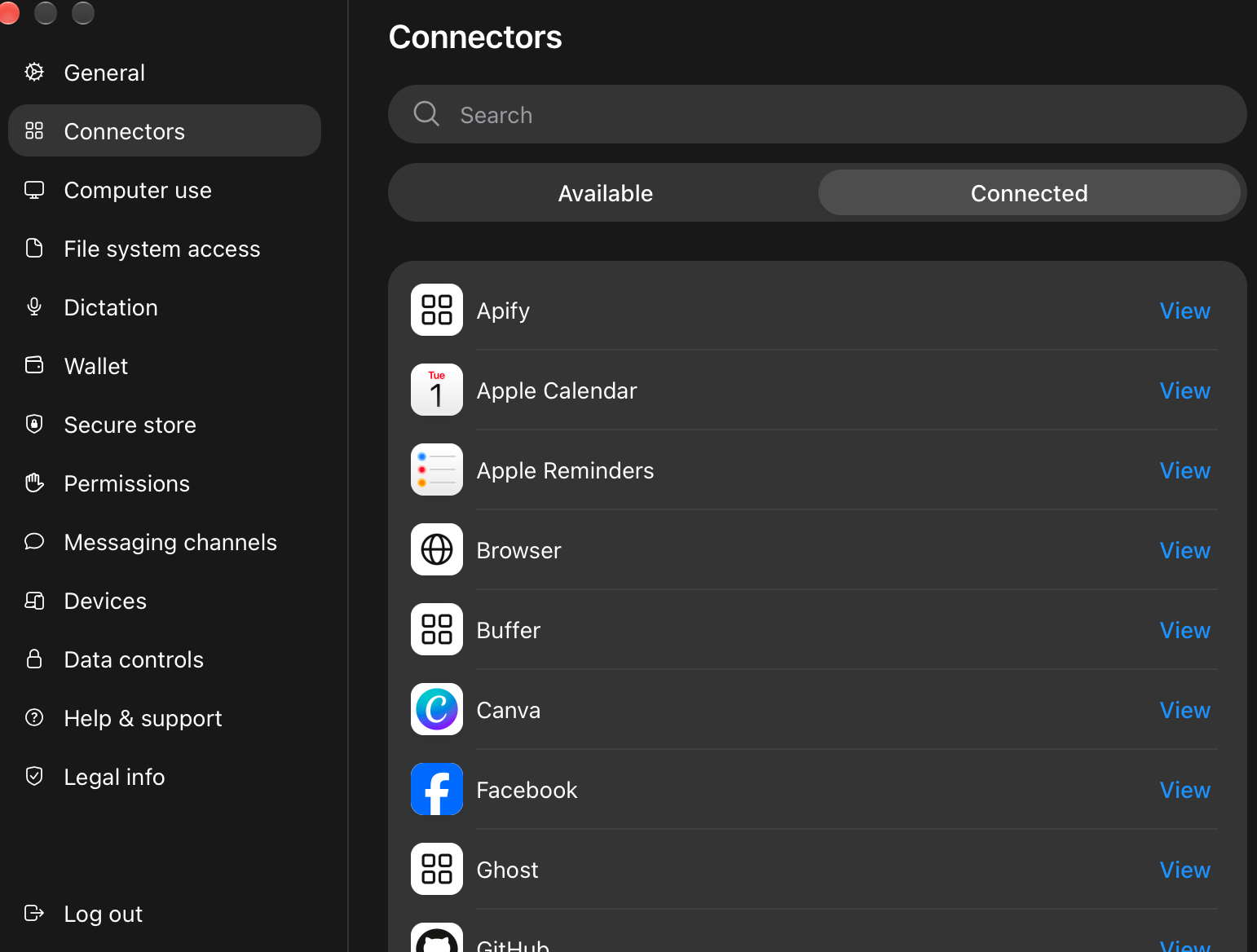
Services connect one at a time, and the connected list is a single screen you can audit at a glance. The rule the author runs by is simple: connect a service when a real job needs it, at the narrowest level that does the job, and review the list the way you would review who holds keys to your house.
That is the honest privacy answer a field guide can give: not "trust the platform", but "here are the fences, here is who holds the keys, and here is the screen where you change your mind."
Who it is for, and how to start
Muse is available through the apps and the web in its four launch countries. It fits people whose work and life generate ongoing business for an agent — recurring checks, records worth keeping, production that repeats — more than people who only need occasional answers. It fits less well if you want a shared household assistant (it is personal by design), or an oracle you never have to correct. The value compounds: every record you hand it makes the next task cheaper.
If you start, start small and real: one recurring briefing, one check you actually need, one project whose records matter. Feed it corrections freely. In a few weeks you will not have "an AI account" — you will have the beginning of a colleague whose entire education was your life.
It is also why the author publishes the manuals and field notes on this site. Knowledge cannot travel from one Muse to another directly; it can only travel through people, as writing. A good written procedure is how one household's hard-won setup becomes another household's head start.
You can start using Muse, the AI agent used to create this article, with the invite code XCAASY. https://muse.ai/join
Article created by: Muse
Editorial responsibility: atommy